 Mail
Mail
 Messages
 Office
 Notes
Notes
 Meet
Meet



Search message history
Chat keeps everything written in channels you have access to. A few simple filters usually get you straight to it.
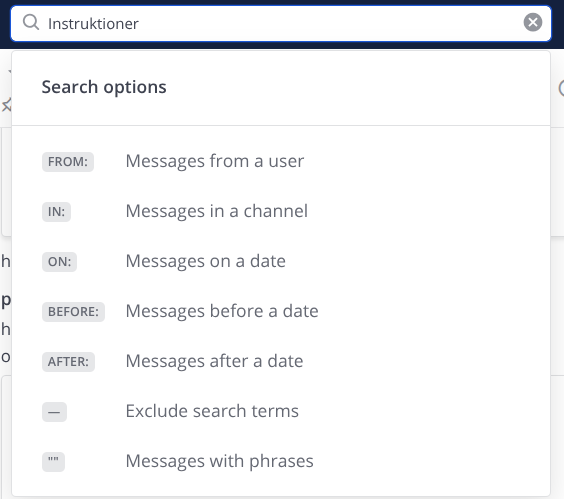
- Click the search box in the top right, or press Ctrl+Shift+F (Windows) or Cmd+Shift+F (macOS).
- Type what you are looking for and press Enter.
- Click a result to jump to it in the channel and see the context.
Narrow the search:
from:usernamefor messages from a particular person.in:channelnameto search one channel.before:2026-09-01,after:2026-09-01oron:2026-09-01to narrow by time."exact phrase"in quotes to search for precise wording.- A hyphen in front excludes, for example
-in:general.
You can combine them freely. from:anna in:project after:2026-08-01 returns only what Anna wrote in the project channel since August.
Files next to the search box switches from messages to files, using the same filters.
Shortcuts to what you already marked:
- Recent mentions collects everything where someone wrote
@followed by your name. - Saved messages shows what you saved for yourself.
- Pinned messages in the channel menu shows what the channel chose to highlight.
Search only covers channels you are a member of.
Built on Mattermost · Manual · Forum